Skip to content

Every referral, in order of need.

For endodontists and other specialist practices. Incoming cases arrive with their imaging and urgency, sorted so the emergency is always the first row you read.

Incoming referralsUrgency, then recency
CaseUrgencyStatusImaging
ER-2481Tooth 19 · A. PatientEmergency4 files
ER-2477Tooth 30 · A. PatientUrgentReceived3 files
ER-2470Tooth 8 · A. PatientUrgentScheduled2 files
ER-2464Tooth 14 · A. PatientRoutineIn treatmentMissing imaging
Sample queue, privacy mode on. The emergency arrived last and sorts first.

Which of today's referrals is the emergency?

The first row. Urgency is set on the referral and the queue sorts by it, then by arrival, so the emergency is read before the routine case.
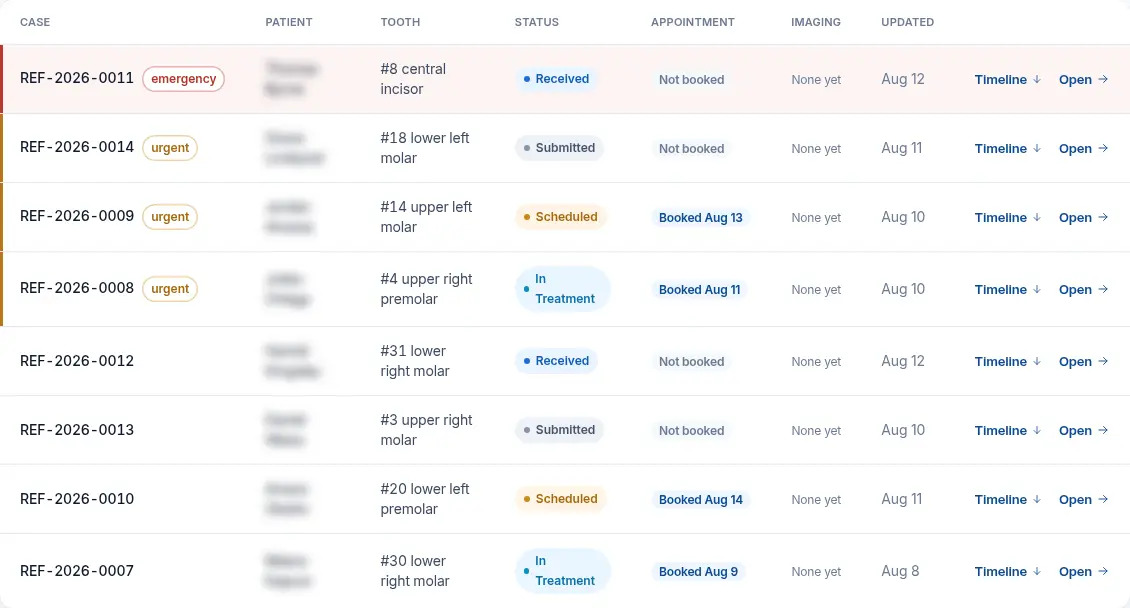
  • Ordered by urgency, then by how recently the case arrived.
  • Filter by urgency or imaging; search by patient or case number.
  • Cases without imaging are flagged before you open them.
  • Accept into your queue, or decline and the patient is referred back to their dentist.
Incoming referralsReal queue, sorted by urgency
The real specialist queue sorted by urgency with patient names blurred: an emergency case first, then urgent cases, each with status and appointment
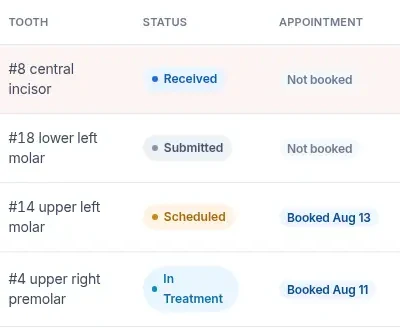
Detail · statusDetail of queue rows: tooth, status and appointment
Illustrative case data · privacy mode on

Your questions, on every referral.

Each specialty starts from a shared set of referral questions. Make it your practice's own and the form referring offices fill in asks what you need.

Specialty questionsCustomised for your practice
Is the tooth sensitive to cold?
LingeringBriefNone
Previous root canal treatment on this tooth?
YesNo
When was it treated?Shows only when the answer above is Yes
Saved for your practice. The shared default stays untouched.
Sample questions. Multiple choice and conditional questions are supported.

From accepted to reported.

Each step is a single action on the case, and both offices see the change.

Accept into queueReceived

Or decline, and the patient is referred back to their dentist.

The referring office sees the decision
Schedule the appointmentScheduled

The date shows for the referring office and on the patient's tracking page.

Appointment on the record
Start treatmentIn treatment

The case timeline records the step for both offices.

Written to the case timeline
Complete and send reportCompleted

Your report returns to the referring office on the same record.

Report back on the same record

Bring your referring offices.

Send an office an invite link. When they open it, the new referral is already addressed to your practice. If you need to pause, switch off new referrals and offices see that you are not taking them.

Referring officesYour practice
Accepting new referrals
  • Invite linkCreated Sep 28Open
  • Invite linkCreated Sep 21Used
The link opens a referral already addressed to your practice.
Sample invites with illustrative dates.

Your pipeline, measured from your own cases.

Practice reports show six months of referral volume, cases by stage and average turnaround, scoped to your practice.

Practice reportsScoped to your practiceYour data only
Volume
Referrals over the last six months
Pipeline
Cases by stage, and average turnaround
Sources
Top referral sources, with contact cards for referring providers
Audit
Every case view in the tamper-evident log, reviewed read-only by administrators